BezoektijdenGesloten
|Dinsdag, oktober 27, 2026Edinburgh, Schotland – Old Town, New Town & Holyrood Park
Terug naar planning
map
Read the Edinburgh HoHo Map — Routes, Hops & Transfers
Understand HoHo route colours, major transfer hubs and the fastest ways to stitch together a day using the city sightsee map.
3/12/2026
6 min read
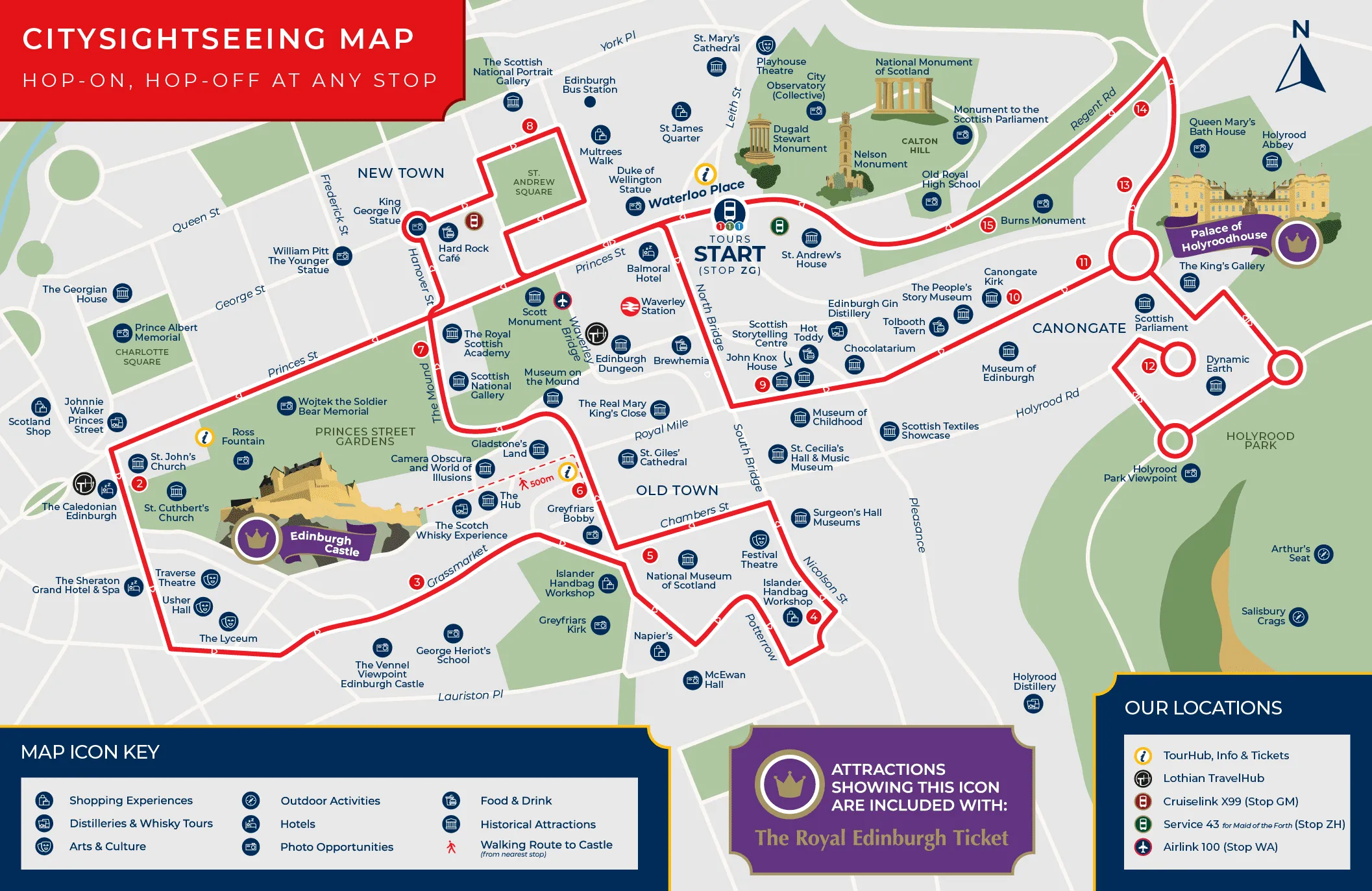
HoHo Paths & Map — Read This First
Before you board, open the map image and orient yourself: the file city_sightseeing_map_00.webp shows the HoHo loops, key stops and suggested walking connections.
Quick legend (how to read the map)
- Route colours: each loop is colour-coded — follow the colour to see which stops are on that loop.
- Major hubs: Waverley Bridge / Princes Street and Ocean Terminal (Leith) are transfer points — look for the hub symbols.
- Icons: castle, museum, viewpoint and ferry icons show nearby attractions.
Three practical uses
- Plan your first loop: identify the hub closest to your accommodation and ride the loop once to get bearings.
- Identify long-stop candidates: castle, Britannia, or Arthur's Seat — mark them on the map before leaving the bus.
- Pick a coastal return: if the map shows a Leith/Portobello extension, plan to use it in the afternoon for calmer light and better dining options.
Sample path examples
- Fast orientation (2–3 hours): Waverley Bridge → Castle → Royal Mile (hop-off) → Princes Street (short walk) → return to hub.
- Relaxed afternoon: Waverley Bridge → Leith (Ocean Terminal) → Britannia → Shore lunch → tram or HoHo back.
Map-reading tips
- Match the map's numbered stops to the on-bus announcements — numbers are faster than names.
- Zoom the image on your phone to read small icons; keep it handy when you hop off.
Save & share
- Download the map image for offline use. If you need a printable version, open the image in full resolution and print landscape.
Tip: Use the map to decide 1–2 long stops and several short hops — this balances depth and movement.
Over de auteur

Map Editor
Deze gids geeft praktische, onafhankelijke adviezen over het gebruik van hop‑on hop‑off services in Edinburgh — de beste haltes, slimme planningstips en lokale verhalen om je bezoek te verrijken.
Tags
map
routes
planning
Comments (0)
Leave a Comment
Loading comments...